Frequently asked questions
Table of contents
- Locked out?
- Why are users denied access after upgrading?
- Why do I get
Account is not fully set upfor the direct grant? - Why is the required action enabled again after I removed it?
- Do I still need the authenticator?
- Does it work with Keycloak version X.Y.Z?
- Why not use “Allow/Deny Access” authenticators with conditions?
- Getting error KC-SERVICES0013: Failed authentication
Locked out?
If users cannot log in to a realm because of the extension, log in to the admin console of the admin realm and disable the required action in that realm, or fix the restriction.
If you are locked out of the admin realm itself, e.g. after denying access by default there, you have two options.
Use a temporary admin service account
Stop Keycloak and create a temporary admin service account. It logs in via the client credentials grant, which the extension does not check. The command prompts for a client secret.
bin/kc.sh bootstrap-admin service --client-id=temp-admin
Start Keycloak again and use the service account with the Admin CLI to fix the configuration, e.g. to disable denying access by default, to remove a restriction, or to bind the default browser flow if the authenticator causes the lockout:
kcadm.sh config credentials --server http://localhost:8080 --realm master --client temp-admin --secret <secret>
kcadm.sh update realms/master -s browserFlow=browser
Delete the service account afterwards.
Disable the required action provider
If the required action causes the lockout, disable the required action provider via the server configuration, e.g. in conf/keycloak.conf:
spi-required-action--restrict-client-auth-enforce--enabled=false
or as a command line option:
bin/kc.sh start --spi-required-action--restrict-client-auth-enforce--enabled=false
Keycloak 26.2 does not support this format with -- separators and ignores it. Use spi-required-action-restrict-client-auth-enforce-enabled=false there.
Keycloak then skips the required action in all realms, even though it is still registered and enabled. Since this is a build time option, run bin/kc.sh build again if you use an optimized server image. Log in, fix the configuration, remove the option, and restart Keycloak.
Why are users denied access after upgrading?
The required action is enabled by default. It checks access at the end of every login, also for paths that did not run through the authenticator before, e.g. single sign-on or identity provider redirects. It checks all restrictions a client has, including leftover Keycloak Client Resources without a permission. See the upgrade notes.
Why do I get Account is not fully set up for the direct grant?
Keycloak evaluates required actions for the resource owner password credentials grant, but cannot show them to the user. If the required action denies access, Keycloak rejects the grant with this error. Add the authenticator to the direct grant flow or use the restrict-client-auth-enforce client policy executor for a dedicated error.
Why is the required action enabled again after I removed it?
The required action is registered and enabled on every start in all realms in which it is not registered. Disable it instead of removing it. A disabled required action stays disabled.
Do I still need the authenticator?
No. The required action and the restrict-client-auth-enforce client policy executor check access on all paths. See Authenticator and flows for cases in which the authenticator is still useful.
Does it work with Keycloak version X.Y.Z?
If you are using Keycloak version X (e.g. X.y.z), version X.b.c should be compatible. Keycloak SPIs are quite stable. So, there is a high chance this extension will work with other versions, too. Check the details of latest compatibility test run for an overview or simply give it a try.
Extension version X.b.c is compiled against Keycloak version X.y.z. For example, version 16.3.1 will be compiled against Keycloak version 16.y.z.
I do not guarantee what version a.b or y.z will be. Neither do I backport features to older version, nor maintain any older versions of this extension. If you need the latest features or bugfixes for an older version, please fork this project or update your Keycloak instance. I recommend doing the latter on regular basis anyways.
Why not use “Allow/Deny Access” authenticators with conditions?
With Keycloak 13 two new authenticators have been added, namely Allow Access and Deny Access. Together with Condition - User Role authenticator authentication may be restricted in a similar way with out-of-the-box features. So, the question is why not use that and override authentication flows on a per client basis?
Here are some reasons/thoughts
- It is not really flexible. Since
Condition - User Roleonly allows for checking one concrete (realm or client-specific) role, a very complex flow handling all clients, or a totally separate flow for each individual client would be needed. - It simply does not work well with federated authentication (ie. identity provider redirects), since there is no way to configure client specific behaviour for
First login floworPost login flows. In other words, there is no feature likeAuthentication flow overridesat an IdP level. Hence, the same flow will be used for all clients. As said before, this becomes very complicated. - No authentication flow runs when tokens are refreshed or exchanged. The client policy executor of this extension checks access in these cases, too.
Getting error KC-SERVICES0013: Failed authentication
When getting an error or warning like this,
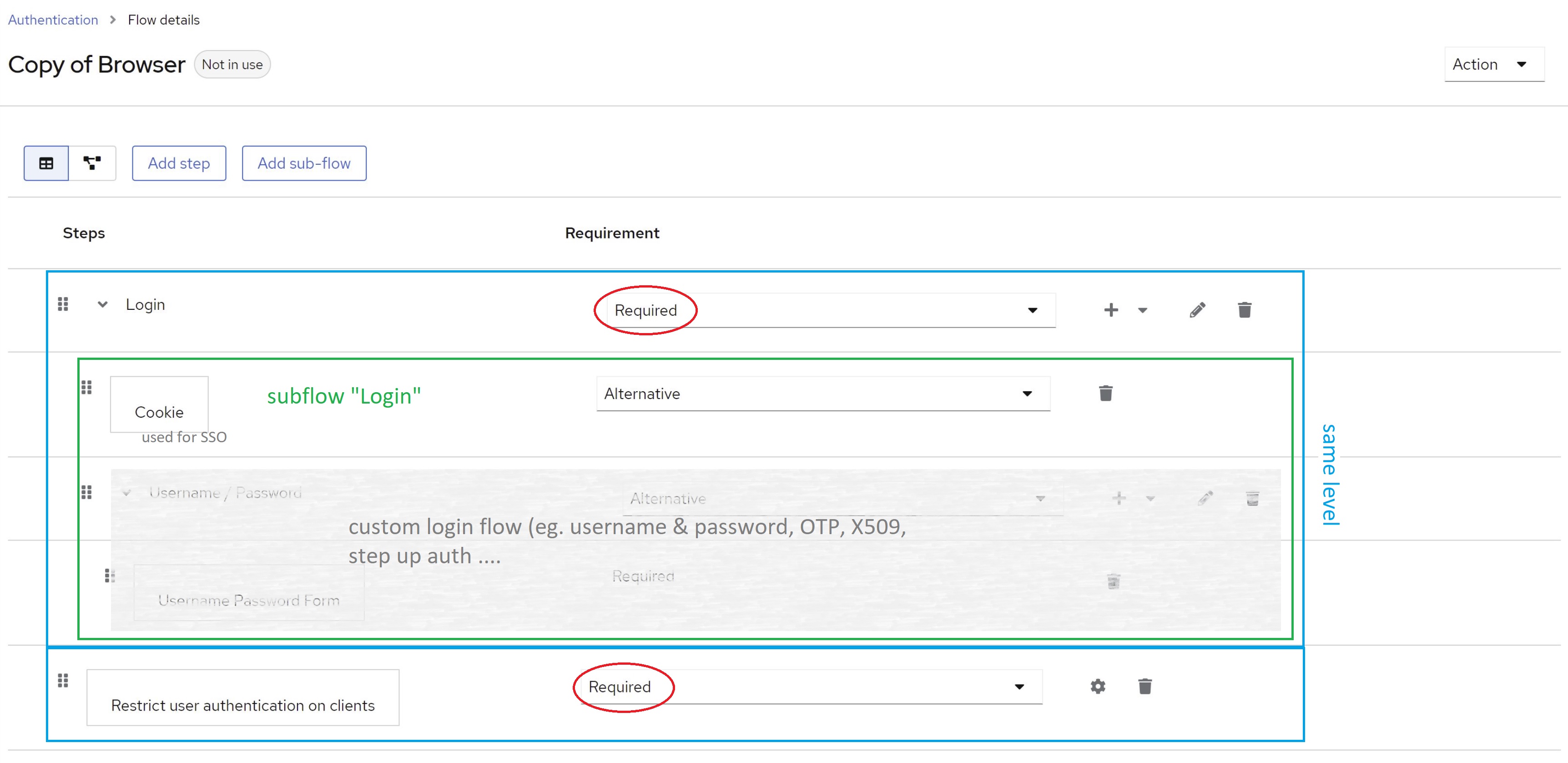
WARN  [org.keycloak.authentication.DefaultAuthenticationFlow] (default task-26) REQUIRED and ALTERNATIVE elements at same level! Those alternative executions will be ignored: [auth-cookie, identity-
provider-redirector, null]
WARN  [org.keycloak.services] (default task-26) KC-SERVICES0013: Failed authentication: org.keycloak.authentication.AuthenticationFlowException: authenticator: restrict-client-auth-authenticator
you have most likely mixed required and alternative subflows/steps/authenticators at the same level in your custom flow. Keycloak does not support this.
Make sure you do not combine required and alternative authenticators at the same level. See the following image for details: