Authenticator and flows
Table of contents
The required action and the restrict-client-auth-enforce client policy executor check access no matter which authentication flow has been used. You do not need the authenticator for that.
Add the authenticator to a flow if you want to
- deny access within the flow, i.e. before other required actions run, e.g. before users are asked to update their profile or to configure OTP,
- show a different error message for certain clients, via a flow override per client,
- return a dedicated error for the resource owner password credentials grant instead of
Account is not fully set up.
Adding the authenticator to a flow
- Create a new flow per binding (e.g. browser flow, direct grant flow etc.)
- Add a sub-flow e.g. named
Loginand mark it asRequired - Within the
Loginsub-flow add authenticators/executions/conditionals and further sub-flows as needed (see Keycloak documentation for details) - Add the step
Restrict user authentication on clientsafter theLoginsub-flow and mark it asRequired. - Then bind your newly created flow as desired - either as a default for the whole realm or on a per-client basis.
See the image below for an example.
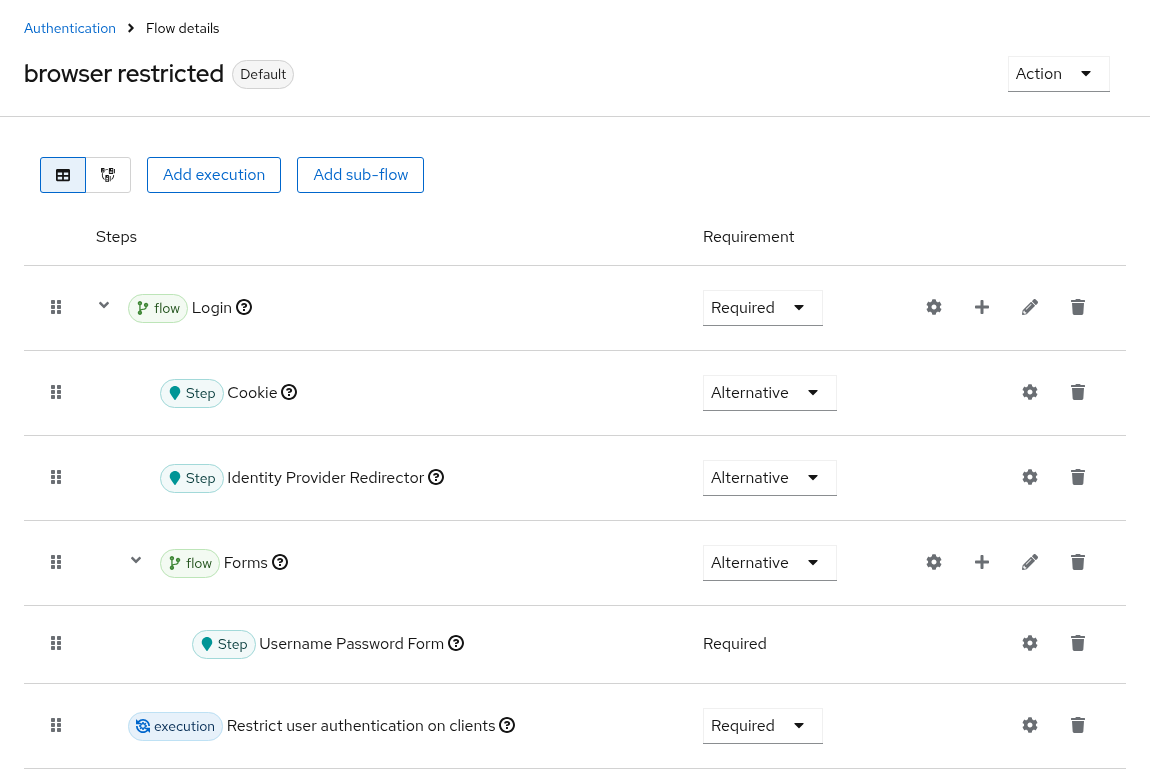
The authenticator needs a user identity to check whether the user has access or not. Hence, ensure that you have steps in your flow prior to this authenticator that identify the user.
Do not combine
RequiredandAlternativesteps at the same level, and do not add the authenticator as anAlternative. Keycloak lets users choose between alternatives, e.g. via “Try another way”, so users who are denied by one restriction could pick another one. See Getting error KC-SERVICES0013.
Configuring the authenticator
Choose the gear icon of the Restrict user authentication on clients step.
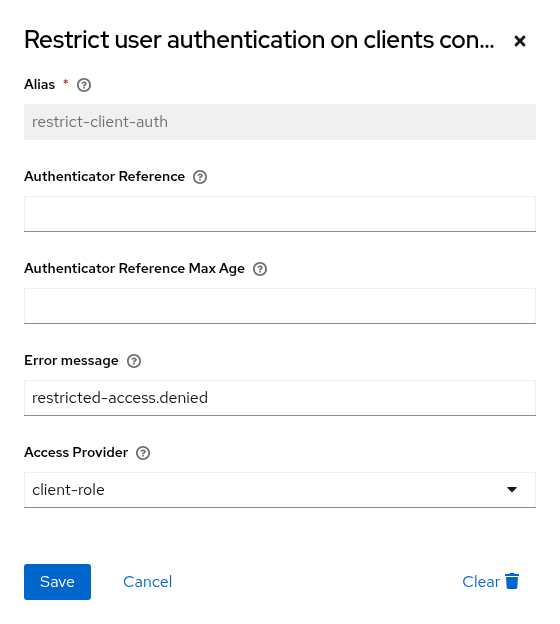
| Option | Key | Description |
|---|---|---|
| Error message | restrictClientAuthErrorMessage | The error message shown if access is denied, see error messages. |
| Access Provider | accessProviderId | The access provider that decides which clients are restricted: client-role, policy, or auto for both. If not set, the server-wide default access provider is used. |
Server-wide default access provider
Authenticators without a configured access provider use the server-wide default access provider. If none is configured, they use client-role.
Set the server-wide default access provider via the server configuration, e.g. in conf/keycloak.conf:
spi-restrict-client-auth-access-provider--provider-default=policy
Keycloak 26.2 does not support this format with -- separators and ignores it. Use spi-restrict-client-auth-access-provider-provider-default=policy there.
Use
provider-default, notprovider. Theprovideroption makes the given access provider the only one, so all other access providers, includingauto, are not available anymore. The required action and therestrict-client-auth-enforceclient policy executor then log a warning and use the given access provider instead ofauto, i.e. they ignore all other restrictions.
Error responses for non-browser requests
For requests that do not accept HTML, e.g. the resource owner password credentials grant, the authenticator responds with an error according to RFC 6749 instead of an error page, so OAuth client libraries can handle it:
| Endpoint | Status | Error |
|---|---|---|
| Token endpoint, i.e. the resource owner password credentials grant | 400 | invalid_grant |
| Other endpoints | 403 | access_denied |
The required action and the restrict-client-auth-enforce client policy executor respond with standard errors as well.
Other flows
Keycloak does not run the browser flow for every path a user may take. The table shows which enforcement point covers which path.
| Path | Required action | Client policy executor | Authenticator |
|---|---|---|---|
| Login via browser flow | ✔ | ✔ (OpenID Connect) | ✔ if in the browser flow |
| Single sign-on (cookie) | ✔ | ✔ (OpenID Connect) | ✔ if in the browser flow, after the Cookie step |
| Identity provider redirects, organizations | ✔ | ✔ (OpenID Connect) | Only via a post login flow, see below |
| First login via an identity provider | ✔ | ✔ (OpenID Connect) | Only via a post login flow |
| Device authorization grant | ✔ during the login in the browser | ✔ | ✔ if in the browser flow |
| Registration | ✔ | ✔ (OpenID Connect) | Not by default |
| Reset credentials | ✔ | ✔ (OpenID Connect) | Not by default |
| Links sent via email (action tokens) | ✔ | ✔ (OpenID Connect) | No |
| Resource owner password credentials (direct grant) | Denied with Account is not fully set up | ✔ | ✔ if in the direct grant flow |
| Refresh token, offline token | No | ✔ | No |
| Token exchange | No | ✔ (Keycloak 26.8 or later) | No |
| CIBA, JWT authorization grant | No | ✔ | No |
| Client credentials (service accounts) | No | No | No |
Registration
Keycloak creates the user account before the required action runs. Users without access to the client can register, but cannot log in to the client. Only allow registration for clients users may access after registering, or grant access to new users, e.g. via a default group.
Reset credentials
The required action runs after the reset credentials flow. Users can reset their password, but cannot log in to clients they do not have access to afterwards.
Identity provider redirects
When your authentication flow includes an identity provider redirect (e.g., using the organization feature, Identity Provider Redirector, or Home IdP Discovery), Keycloak does not execute subsequent steps in the authentication flow after the redirect. This is a known issue tracked in Keycloak issue #10250.
The required action checks access after the redirect, so you do not need to do anything if it is enabled. If you only use the authenticator, configure a post login flow for the identity provider:
- Create a custom authentication flow:
- Go to
Authenticationfrom the left-hand menu. - Under the
Flowstab, clickCreate Flow. - Enter a name for the flow, such as
Restrict Authentication Post Login Flow, and selectGenericas the flow type. - Click
Save. - After creating the flow, click
Add Stepto add steps to the flow. - Add the step
Restrict user authentication on clients.
- Go to
- Assign the post login flow to the identity provider:
- Go to
Identity Providers. - Select the identity provider (e.g., “Google”) used in the redirect flow.
- In the settings of the identity provider, locate the
Post login flowoption. - Assign the newly created authentication flow (e.g.,
Restrict Authentication Post Login Flow) to this setting.
- Go to
Repeat this for every identity provider users may log in with.
Direct grant
Keycloak evaluates required actions for the resource owner password credentials grant, but cannot show them to the user. If the required action denies access, Keycloak responds with invalid_grant and Account is not fully set up. For a dedicated error, add the authenticator to the direct grant flow, which responds with invalid_grant and Access to client is denied., or use the restrict-client-auth-enforce client policy executor.